
Creating a productive home office environment is essential for anyone looking to balance comfort with efficiency while working remotely. Whether you’re a full-time remote worker or occasionally work from home, having a well-organised and inviting workspace can significantly improve your focus, motivation, and overall job satisfaction. In this post, we’ll explore practical tips to help you set up a home office that supports your best work.
Choose the Right Location
Finding the ideal spot for your home office is the first step towards productivity. Consider these factors:
– Quiet and Private: Select a space away from household noise and distractions.
– Natural Light: Try to position your desk near a window to benefit from daylight, which can improve mood and alertness.
– Space for Movement: Ensure there’s enough room to move around comfortably and store necessary items.
Avoid working from places like the sofa or bed, as these can negatively affect your posture and concentration.
Invest in Comfortable and Functional Furniture
Your office furniture plays a huge role in your comfort and productivity.
– Ergonomic Chair: Choose a chair that supports your back and encourages good posture.
– Desk at the Right Height: Your desk should allow your arms to rest comfortably at a 90-degree angle while typing.
– Adequate Desk Space: Ensure there’s enough room for your computer, notes, and any other tools you use daily.
Consider using a sit-stand desk to vary your posture throughout the day if possible.
Organise and Declutter Your Workspace
A tidy workspace helps keep your mind clear and focused.
– Storage Solutions: Use shelves, filing cabinets, or drawer organisers to store documents and supplies neatly.
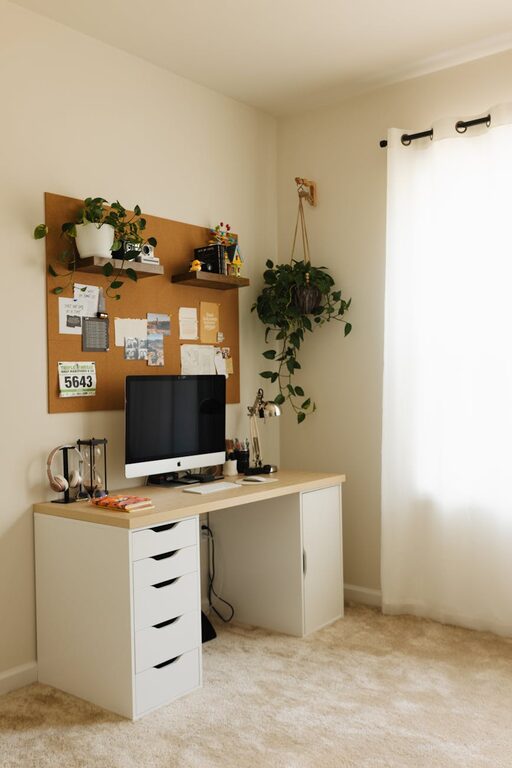
– Cable Management: Keep wires under control with clips or cable trays to avoid a messy desk.
– Minimise Items on Desk: Keep only the essentials on your desk to reduce distractions.
Schedule a quick tidy-up at the end of each day to maintain a clean environment.
Optimise Lighting
Good lighting reduces eye strain and keeps you alert.
– Use Natural Light: As mentioned, position your desk close to windows if possible.
– Add Task Lighting: A desk lamp with adjustable brightness helps illuminate your work area precisely.
– Avoid Glare: Place screens perpendicular to windows to avoid reflections on your monitor.
Consider softer, warmer bulbs for a relaxing atmosphere in the evening if you work late.
Minimise Distractions
Controlling distractions is key for sustained focus.
– Sound Control: Use noise-cancelling headphones or play soft background music if it helps concentration.
– Set Boundaries: Communicate your working hours to friends or family members to minimise interruptions.
– Manage Notifications: Turn off non-essential alerts on your devices during work periods.
Apps that block distracting websites can also improve concentration.
Personalise Your Space
Customising your office makes it inviting and motivating.
– Add Plants: Greenery improves air quality and adds a calming touch.
– Inspirational Decor: Use artwork or quotes that inspire you.
– Comfort Items: A soft rug or cushions can make your space cosier.
However, avoid cluttering the space with too many personal items.
Prioritise Good Technology Setup
Reliable technology is fundamental for effective remote work.
– Upgrade Your Internet Connection: Fast and stable internet helps avoid frustrating delays.
– Ergonomic Peripherals: Invest in a quality keyboard and mouse to reduce strain.
– Monitor Setup: Use an external monitor or dual screens for better multitasking capabilities.
Regularly update your software and backup important files to prevent disruptions.
Create a Routine and Dedicated Work Hours
Structure helps maintain balance.
– Set Regular Hours: Try to start and finish work at consistent times to establish routine.
– Take Breaks: Incorporate short breaks to stretch and clear your mind.
– Separate Work from Leisure: At the end of the day, step away from your workspace to relax fully.
Time management tools or planners can support this process.
Maintain Good Air Quality and Temperature
A comfortable atmosphere improves focus and well-being.
– Ventilate the Room: Open windows regularly to refresh the air.
– Control Temperature: Adjust heating or cooling to a comfortable level.
– Consider Air Purifiers: If your space lacks ventilation, an air purifier can help reduce dust and allergens.
Final Thoughts
Creating a productive home office is about blending comfort, organisation, and focus-friendly elements. By choosing the right location, investing in quality furniture, organising your workspace, and managing distractions, you’ll pave the way for successful and enjoyable remote working. Remember, a home office is a personal space — adapting it to your needs will make all the difference in your productivity and happiness.
Related Posts

Tips for Creating a Productive Home Workspace to Boost Focus and Creativity
Creating a productive home workspace is essential for anyone working…
How to Create a Productive Home Office Space That Works for You
Working from home has become a regular part of life…

Tips for Creating a Productive Home Office Environment
Creating a productive home office environment is essential for anyone…